
Free angle finder tool
Online ProtractorMeasure angles in images with three simple clicks.
Measure angles in images with three simple clicks.
Interactive protractor
Interactive protractor
Tip: zoom in to inspect details, then use the scrollbars to move around the image.
About this tool
Online Protractor – Measure Any Angle in Three Clicks
An online protractor is a simple angle measurement tool that works in your browser. Upload or paste a photo, diagram, screenshot, or drawing, then choose three points to measure the angle. This angle finder tool shows the result in degrees without requiring a physical protractor, an app, an account, or a download.
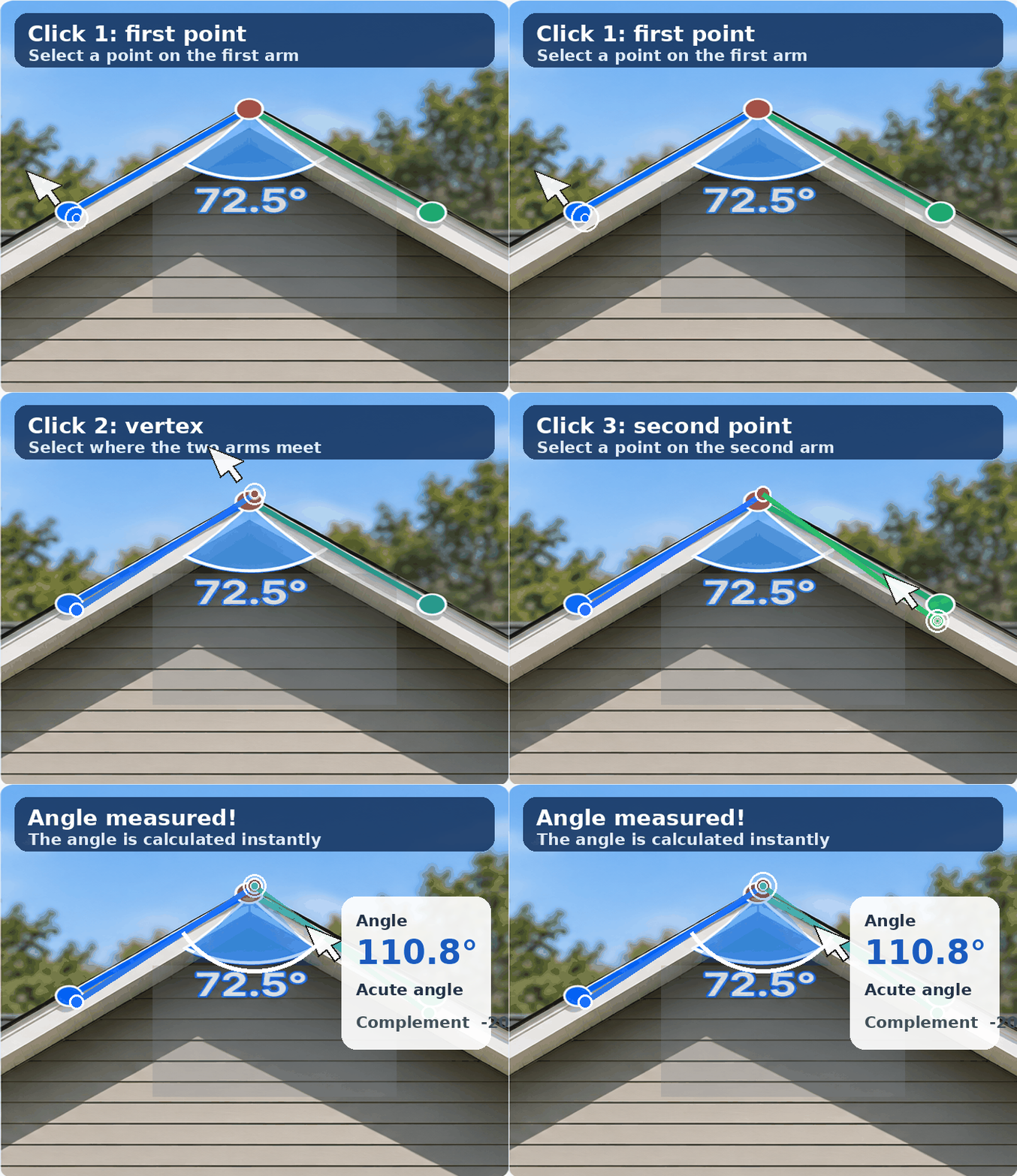
The first point marks one arm of the angle. The second point marks the vertex, which is the exact corner where the two arms meet. The third point marks the other arm. After the third click, the protractor tool calculates the angle and draws a clear guide over the image. This makes it useful for geometry homework, technical drawings, roof photos, construction checks, design work, and quick visual checks.
You can begin by uploading an image, pasting one from your clipboard, or opening the built-in sample. Zoom controls help you place each point on a small corner or detailed line. The tool can save up to five angle measurements on one image, so you can compare several corners in the same session. Your image and measurements stay in your browser while you work.
How to use the online protractor
- Add an image. Upload a photo, diagram, screenshot, or drawing. You can also paste an image from your clipboard or choose the sample.
- Choose the first arm. Click a clear point anywhere along the first line of the angle.
- Choose the vertex. Click the exact corner where both arms meet. Zoom in when the vertex is small or difficult to see.
- Choose the second arm. Click a point on the other line. The angle measurer calculates the result as soon as the third point is selected.
- Read or repeat the measurement. Read the degree value on the image and in the results panel. Add another angle or clear the measurements when finished.
Who can use an angle measurement tool?
Students can use a free online protractor for geometry practice, homework, worksheets, and classroom demonstrations. Selecting the three points makes the relationship between the arms, vertex, and angle easy to see. Teachers and parents can also use the tool to explain how an angle is measured without placing a large physical instrument over a diagram.
The angle finder is also useful for designers, engineers, architects, DIY users, and anyone checking an angle in a picture. Measure a roof slope, stair line, product drawing, map, screenshot, or technical sketch from a computer, tablet, or phone. A larger screen may make detailed work easier, but the responsive tool works on desktop and mobile devices.
A clear protractor tool for quick angle checks
This angle finder tool focuses on the part of the image you want to inspect. Instead of hiding the picture behind a large virtual protractor, it keeps the original image visible and places a small overlay on the selected arms. The result is easy to review, and separate saved measurements help you compare several angles in one session.
If you need to measure an angle without a physical protractor, this three-click angle measurer gives you a practical starting point. Select the first arm, select the vertex, select the second arm, and read the result in degrees. For the best result, use a sharp image, zoom in before selecting a small vertex, and click the exact corner where the lines meet.
A few helpful answers
Online protractor FAQ
How do you measure an angle without a protractor?
Upload or paste an image into this online angle finder, then click one point on the first arm, the vertex, and one point on the second arm. The tool calculates the angle in degrees.
How do you measure angles using a protractor?
Place the protractor centre on the vertex, align its baseline with one arm, and read the scale where the other arm crosses it. With this online protractor, choose the two arms and the vertex directly on an image instead.
How many degrees in a circle?
A full circle has 360 degrees. A straight angle has 180 degrees, and a right angle has 90 degrees.
What is a protractor?
A protractor is an angle measurement tool marked in degrees. A physical protractor is usually placed on paper, while an online protractor measures an angle on an uploaded, pasted, or sample image.
What is an online protractor?
An online protractor is a browser-based protractor tool. It lets you select three points on an image to identify the two arms and the vertex of an angle.
Is this online protractor free?
Yes. The free online protractor works in your browser without a download, account, or desktop software.
Can I measure an angle from a photo?
Yes. Upload, paste, or drop a photo, diagram, screenshot, or drawing into the workspace. Select one point on each arm and the vertex between them.
How does the three-click angle finder work?
Click the first arm, click the vertex where the arms meet, and click the second arm. The result is drawn on the image and added to the results panel.
Can students use this for geometry practice?
Yes. It can help with geometry homework, classroom demonstrations, worksheets, and angle measurement practice.
Can I use the online protractor on my phone?
Yes. The responsive interface works on phones and tablets as well as desktop computers. A clear image and larger screen can make detailed work easier.
How many angles can I measure on one image?
You can save up to five separate angle measurements on one image. Use Measure another angle to continue, or clear the measurements to begin a new set.